

How to Log Food With Siri: Hands-Free Calorie Tracking Setup Guide
Log food with Siri in 2 steps: switch Siri on for Nouri in the Shortcuts app once, then say \"Track food in Nouri\" and one sentence. Setup, phrases, fixes.
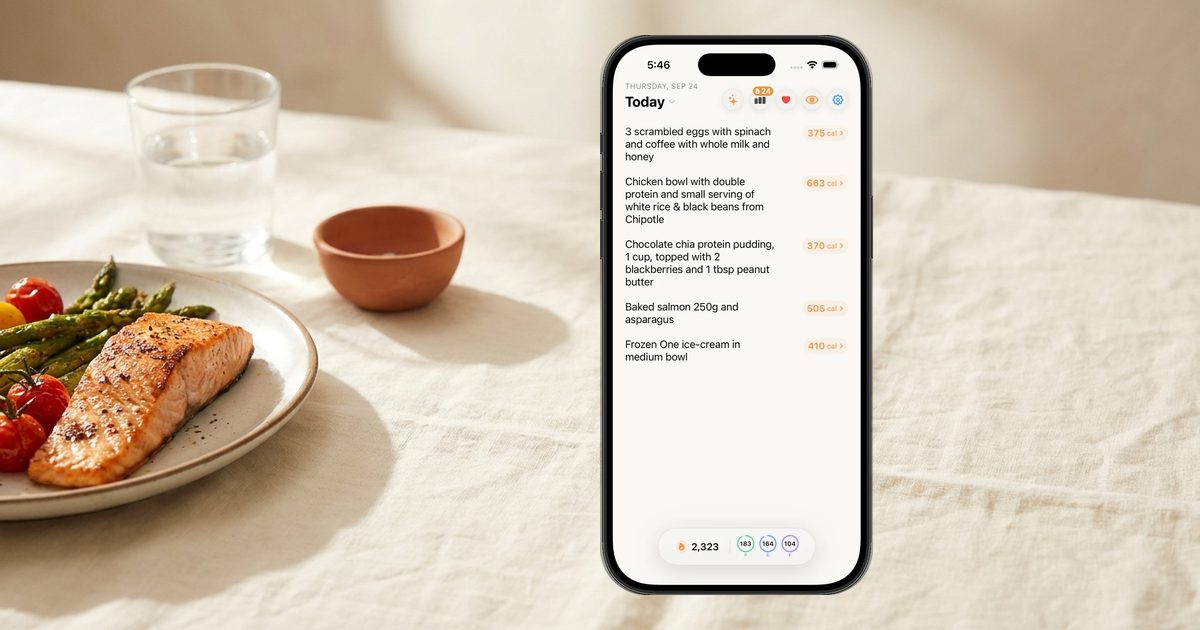
You can log food with Siri in two steps. Once: open the Shortcuts app, find Nouri, tap the "i," and switch Siri on. Then, any time, even with your phone locked: say "Hey Siri, track food in Nouri," and when Siri asks "What did you eat?", answer in one sentence. A card shows the meal's calories and macros plus what is left today.
What hands-free food logging actually means
Siri cannot count calories on its own. It passes your words to an app that can. Apple's Shortcuts guide says apps with built-in shortcuts list them in the Shortcuts app under App Shortcuts, and a calorie tracker that supports Siri is a tracker that ships one of these actions.
The quality of "Siri logging" varies. Some actions open a search screen, so you finish with your thumbs. Some log a number you already know. The useful version takes a plain description of a meal, estimates it, saves it, and tells you the result without the app opening. That is the bar this guide uses.
Voice suits food because you already know what you ate, including what no camera can see: the butter in the pan, the second sauce. We compare input styles in text vs voice vs photo calorie tracking; Siri is voice without unlocking the phone.
Step 1: one-time setup (do this first)
Most "Siri says it can't do that" problems come from skipping this step. A reviewer on the App Store put it simply: make sure you allow Siri in Shortcuts first. Here is the full checklist.
Turn Siri on. If you skipped Siri when you set up your iPhone, Apple's guide says to open Settings, tap Siri, then tap Turn On Siri and follow the prompts.
Choose how you wake it. In Settings, tap Siri, then Requests, and turn on "Siri" or "Hey Siri" if you want to start hands-free. You can also turn on Press Side Button for Siri. Apple notes that saying just "Siri" is available on supported models in some languages and regions.
Allow Siri on the lock screen. Go to Settings, then Face ID & Passcode (or Touch ID & Passcode). Apple lists Siri among the features under Allow Access When Locked. Leave it on if you want to log without unlocking.
Switch Siri on for Nouri. Open the Shortcuts app, find Nouri, tap the "i" in the top-right, and switch Siri on. This is the step people miss, and it is the same instruction Nouri shows in its own "Using Siri with Nouri" tip.
Sign in once. Open Nouri and make sure you are signed in. Siri runs Nouri in the background, so if you are signed out, Siri will reply "Please open Nouri and sign in first."
No custom phrase to record: Nouri's phrases are built in.
Step 2: say the phrase, then the meal
The flow has two short turns:
- You: "Hey Siri, track food in Nouri."
- Siri: "What did you eat?"
- You: one sentence describing the meal.
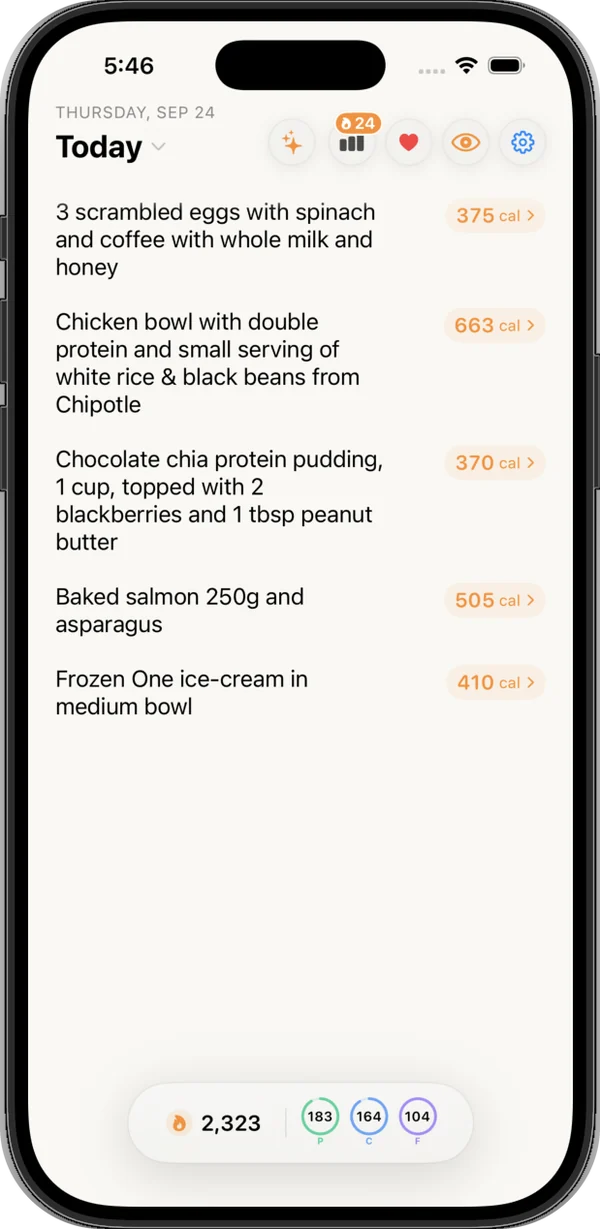
Nouri logs it right away, with no confirmation step. While it works, you may see "Calculating your meal..." Then Siri tells you roughly how many calories it logged and where that puts you against your daily goal, and shows a card with the meal name, its calories, and protein, carbs, and fat. Underneath is a "Today" row: calories eaten out of your goal, how many are left (or how many over), a progress bar, and three small rings for protein, carbs, and fat against your targets.
This is why we call Nouri the best Siri logging of any calorie tracking app: one sentence from the lock screen, and the calories and macros card with what you have left appears right away, without opening the app.
Phrases that work
"Track food in Nouri" is the phrase Nouri's own tip calls the most reliable. The app also registers dozens of variations, so natural wording usually works too:
| Say | Notes |
|---|---|
| "Hey Siri, track food in Nouri" | The most reliable |
| "Hey Siri, log my food in Nouri" | Same action |
| "Hey Siri, track my dinner in Nouri" | Also breakfast, lunch, or snack |
| "Hey Siri, add a meal to Nouri" | "Add" and "log" variants both work |
| "Hey Siri, Nouri log" | Shortest form |
Every one of these runs the same "Add Food" action, and the entry is saved to today. The meal word in "track my dinner" is just part of the phrase. If Siri ever asks "Nouri or Notes?", tap Nouri.
Locked phone, no unlock
Apple's Shortcuts guide says that when your device is locked and you run a shortcut that opens an app, Siri asks you to unlock first. Nouri's action does not open the app, so the whole exchange happens on the lock screen. One small catch from how iOS protects app data: after a restart, unlock your iPhone once before Siri logging can sign in for you.
Example sentences that log well
Siri hears you once, so the sentence does the work. Nouri's in-app logging tip boils it down to three things: include the brand, the portion, and the prep method when you can. A few that work well:
| Instead of | Say |
|---|---|
| "Chicken" | "Six ounces of grilled chicken breast with a cup of white rice" |
| "Eggs" | "Two eggs scrambled in butter and a slice of sourdough toast" |
| "A burrito bowl" | "Chipotle chicken bowl, brown rice, black beans, cheese, and guac" |
| "Pasta" | "A big bowl of spaghetti with meat sauce and parmesan, about two cups" |
| "Coffee" | "Large oat milk latte, no sugar" |
| "Salad" | "Caesar salad with grilled chicken and two tablespoons of dressing" |
Three habits matter most. Name the chain at restaurants. Say what it was cooked in, because if you do not mention the fat, Nouri assumes seed oils for the Health Score, and "cooked in butter" or "olive oil" changes that. And say the drink and the sauce, the two items people skip most (more in common food logging mistakes).
You can put a whole meal in one sentence: "Two slices of pepperoni pizza, a side salad with ranch, and a can of Coke." Nouri splits it into separate items and estimates each one. Say "large fries, and yes, the ranch" to Siri and Nouri does the math before you wipe your hands.
Not sure of a portion? Use a hand or household reference: a fist, a palm, "about a cup," "half the plate." How to track calories without weighing food has the full list of visual cues.
How the Nouri Siri flow was built
A few decisions we made building this, and why.
No confirmation step. Nouri logs as soon as you answer. There is no read-back-and-confirm turn, so it is one step from the lock screen. Fixing the odd entry later in the app costs less than a confirmation dialog on every meal.
The card shows the day, not only the meal. "450 calories" on its own is trivia. "450 calories, 610 left" is a decision about dinner. So the result card fetches today's totals and goals at the same time as the meal, and shows the remaining number in the corner. If you go over, the bar turns amber, and red past 10 percent over.
The app stays closed. The action is set not to open Nouri, which is what lets it finish on the lock screen. The log still appears in the app instantly if it is open: Nouri listens for Siri logs and refreshes today's list.
All of this comes from why I started Nouri. In MyFitnessPal, logging a normal dinner took several minutes, so after a long day I would not do it, and a tracker you stop opening has an accuracy of zero. One sentence to Siri is the lowest-effort log we could design. Speed is half of it; the estimate still has to be right, and Nouri scored 92.1/100 in our 100-meal accuracy benchmark (MyFitnessPal 77.0).
How to fix a Siri entry afterward
Siri sometimes mishears. Fixing it takes seconds in the app:
- Edit the words. Open Nouri, tap the line in today's log, and change the text. Nouri re-estimates the line from the new wording.
- Recalculate with context. Tap the calorie number to open the meal's details, tap the "..." menu, choose Recalculate, and add context such as "smaller portion," "no dressing," or "from Chipotle." Each meal can be recalculated up to three times; after that, Nouri suggests editing the description instead.
- Delete it. Clear the line's text and the entry is removed.
- Log an earlier day in the app. Siri always logs to today. For yesterday's dinner, type it into that day in Nouri.
Tips for noisy places (and quiet ones)
- Give yourself more time. Apple's accessibility settings let you change how long Siri waits for you to finish: Settings, Accessibility, Siri, then Siri Pause Time set to Longer or Longest. Useful for long meal descriptions.
- Use the side button in loud rooms. Press and hold the side button and talk close to the phone. Apple notes that when you activate Siri with a button, Siri responds silently in Silent mode.
- Type instead. On supported models you can type to Siri (Settings, Siri, Requests, Type to Siri). In a meeting or on a train, typing the same sentence works, or open Nouri and type it like a note.
- Two turns, not one. Say "Hey Siri, track food in Nouri" first, then the meal as a separate answer.
- Read the card. The meal name on the card is exactly what Siri heard, so a typo jumps out right away.
Put food logging on the Action button
On iPhone 15 Pro or later, Apple's guide says the Action button can run a shortcut. Two steps:
- In the Shortcuts app, tap the icon in the upper-left corner, then under App Shortcuts tap Nouri. Tap the Add Food shortcut, then tap Use in New Shortcut and save it.
- Go to Settings, then Action Button, swipe to Shortcut, tap Choose a Shortcut, and pick the one you just made.
Now a press and hold of the Action button starts the same Add Food action, no wake word needed.
Other ways to log food by voice
Nouri is not the only option. Facts below come from each company's own site or Apple's documentation, checked October 13, 2026.
| Option | How voice logging works | Price |
|---|---|---|
| Nouri | "Hey Siri, track food in Nouri," one sentence, AI estimate saved with a calories, macros, and remaining card | $9.99/month or $39.99/year, 3-day free trial on the yearly plan; iPhone (iOS only) |
| Cronometer Gold | Voice Log: "Speak to us or Siri and we'll match the key ingredients" | $10.99/mo or $59.99/yr billed annually |
| MyFitnessPal Premium | Voice Log inside the app: describe the meal out loud, then tap once to log it | $9.99/mo or $49.99/yr |
| Apple Shortcuts DIY | Build a shortcut with Ask for Input and Log Health Sample | Free |
Cronometer is the pick if micronutrient depth matters most to you, and its Gold page says Voice Log works by speaking to the app or to Siri, matched to its food data. MyFitnessPal Premium describes Voice Log as talking to the app "like you're talking to a person," then tapping once to log the whole meal; its Premium page does not mention Siri, so expect to open the app.
The do-it-yourself route. Apple's Shortcuts guide lists Log Health Sample as a logging action and gives an example of pairing it with Ask for Input to log your weight from a widget. You can build a shortcut along those lines, but it records a number you supply. It does not estimate a meal. Apple's Health app also has no meal-logging screen of its own, which we cover in does Apple Health track calories eaten, and the iOS 27 camera feature is a lookup rather than a log (see the iOS 27 food camera).
If you would rather not talk to your phone at all, a plain note works surprisingly well; see using Apple Notes as a calorie tracker.
Common Siri logging mistakes
Skipping the Shortcuts toggle. Siri cannot run an app action it is not allowed to use. Do the one-time switch in the Shortcuts app first.
Vague answers. "Chicken" gives Nouri almost nothing, so it assumes a generic portion. Add the amount and how it was cooked.
Giving up after one mishear. Edit the line later. A slightly wrong entry you fix is better than a missing meal, a point how to stick to calorie tracking makes in detail.
FAQ
Can Siri track calories?
Not by itself. Siri runs a calorie app's action, and the app does the estimating and saving. With Nouri, the meal is logged with calories and macros after one spoken sentence.
How do I add food to a calorie app with Siri?
First allow Siri for the app: open the Shortcuts app, find the app, tap the "i," and switch Siri on. Then say the app's phrase. For Nouri it is "Hey Siri, track food in Nouri," followed by your meal in one sentence.
Why does Siri say it can't log food in my app?
Usually the app's Siri switch in the Shortcuts app is off, or you are signed out of the app. In Nouri's case, a signed-out app makes Siri reply "Please open Nouri and sign in first." Also check that Siri is allowed under Allow Access When Locked.
Does Siri food logging work when my iPhone is locked?
It can. Turn on Siri under Allow Access When Locked in Face ID & Passcode settings. Nouri's action does not open the app, so it completes on the lock screen; after a restart, unlock once first.
What do I say to Siri to log a meal?
Start with the trigger phrase, wait for "What did you eat?", then give one detailed sentence. "Two eggs scrambled in butter and a slice of sourdough toast" works far better than "eggs." Include brand, portion, and cooking method when you can.
Can I log breakfast, lunch, or dinner by name with Siri?
Yes, phrases like "Hey Siri, track my dinner in Nouri" work, along with breakfast, lunch, and snack. They all run the same Add Food action, and the entry is saved to today's log.
How do I fix a meal Siri logged wrong?
Open Nouri and edit the line's text, and the line is re-estimated. Or tap the calorie number, open the "..." menu, choose Recalculate, and add context like "smaller portion." Clearing the line deletes it.
Can I use the Action button to log food?
On iPhone 15 Pro or later, yes. Save Nouri's Add Food app shortcut as a shortcut in the Shortcuts app, then pick it under Settings, Action Button, Shortcut. A press and hold starts the log.
Does MyFitnessPal work with Siri?
MyFitnessPal's Premium page describes Voice Log inside the app: describe your meal out loud, then tap once to log it. Its Premium page, checked October 13, 2026, does not mention Siri. Cronometer Gold says its Voice Log works with Siri.
Can I log calories with Apple Health and Siri without an app?
Only roughly. A homemade shortcut using Ask for Input and Log Health Sample can record a number you type, but it will not estimate a meal, so you need to know the calories already.
Is voice logging accurate?
As accurate as the description and the estimate behind it. Specific sentences help most: a portion and a cooking fat change the number a lot. Nouri shows per-item reasoning for every estimate, and scored 92.1/100 in our 100-meal benchmark.
What is the easiest way to track food with Siri?
Set up Nouri's Siri switch once, then say "Hey Siri, track food in Nouri" and answer in one sentence. The card shows calories, macros, and what is left for today right away, and the app never has to open. If Siri mishears, fix the line later in the app.
Hands-free logging only works if it is faster than skipping the meal, and one sentence to Siri is about as fast as it gets. Do the setup once in Nouri, keep how to log restaurant meals handy for eating out, and if you are still choosing a tracker, the most frictionless calorie tracker covers the rest of the field.
Sources
- Apple iPhone User Guide, Turn on and activate Siri on iPhone: support.apple.com/guide/iphone/turn-on-and-activate-siri-iph83aad8922/ios (checked October 13, 2026)
- Apple iPhone User Guide, Change Siri settings on iPhone: support.apple.com/guide/iphone/change-siri-settings-iphc28624b81abc/ios (checked October 13, 2026)
- Apple iPhone User Guide, Change Siri accessibility settings on iPhone: support.apple.com/guide/iphone/change-siri-accessibility-settings-iphaff1d606/ios (checked October 13, 2026)
- Apple Support, Use a passcode with your iPhone, iPad, or iPod touch (Allow Access When Locked): support.apple.com/en-us/119586 (checked October 13, 2026)
- Apple Shortcuts User Guide, Use Siri to run shortcuts with your voice: support.apple.com/guide/shortcuts/run-shortcuts-with-siri-apd07c25bb38/ios (checked October 13, 2026)
- Apple Shortcuts User Guide, Run app shortcuts on iPhone or iPad: support.apple.com/guide/shortcuts/run-app-shortcuts-apd43295406d/ios (checked October 13, 2026)
- Apple Shortcuts User Guide, Run shortcuts with the Action button: support.apple.com/guide/shortcuts/run-shortcuts-with-the-action-button-apdfea15680b/ios (checked October 13, 2026)
- Apple iPhone User Guide, Use and customize the Action button on iPhone: support.apple.com/guide/iphone/use-and-customize-the-action-button-iphe89d61d66/ios (checked October 13, 2026)
- Apple Shortcuts User Guide, share actions (Log Health Sample) and actions in complicated shortcuts: support.apple.com/guide/shortcuts/share-actions-apdaf74d75a5/ios, support.apple.com/guide/shortcuts/about-actions-in-complicated-shortcuts-apd081d9d61f/ios (checked October 13, 2026)
- Cronometer Gold features and pricing: cronometer.com/gold (checked October 13, 2026)
- MyFitnessPal Premium features and pricing: myfitnesspal.com/premium (checked October 13, 2026)
- Nouri accuracy benchmark: /accuracy
Keep reading
All articlesAre AI Calorie Apps Accurate? What the 2026 Research Actually Shows
A 2026 study found an AI photo app underestimated intake by 25%. What the research says about AI calorie apps, and why a photo can't see the oil.
GuidesIn a Calorie Deficit But Not Losing Weight? 9 Reasons and the Fix for Each
In an NEJM study, people reporting under 1,200 calories underreported intake by 47%. 9 reasons the scale won't move, with a fix for each.
GuidesHow Many Calories Do You Need While Breastfeeding? (CDC vs ACOG, Explained)
The CDC says 330 to 400 extra calories a day while breastfeeding; ACOG says 450 to 500. Why they differ and how to find your own number.
Guides'Mom Calories': What Eating Your Kids' Leftovers Really Adds Up To
3 nuggets, some crusts, cheese crackers and juice sips add up to about 297 calories a day, or 2,079 a week. The guilt-free tally, with USDA numbers.