

How to Track Calories in Apple Notes (Free Template + How to Automate It)
A free Apple Notes calorie tracker template with a running total, protein column, and weekly review, plus a USDA-checked 1,799-calorie sample day.
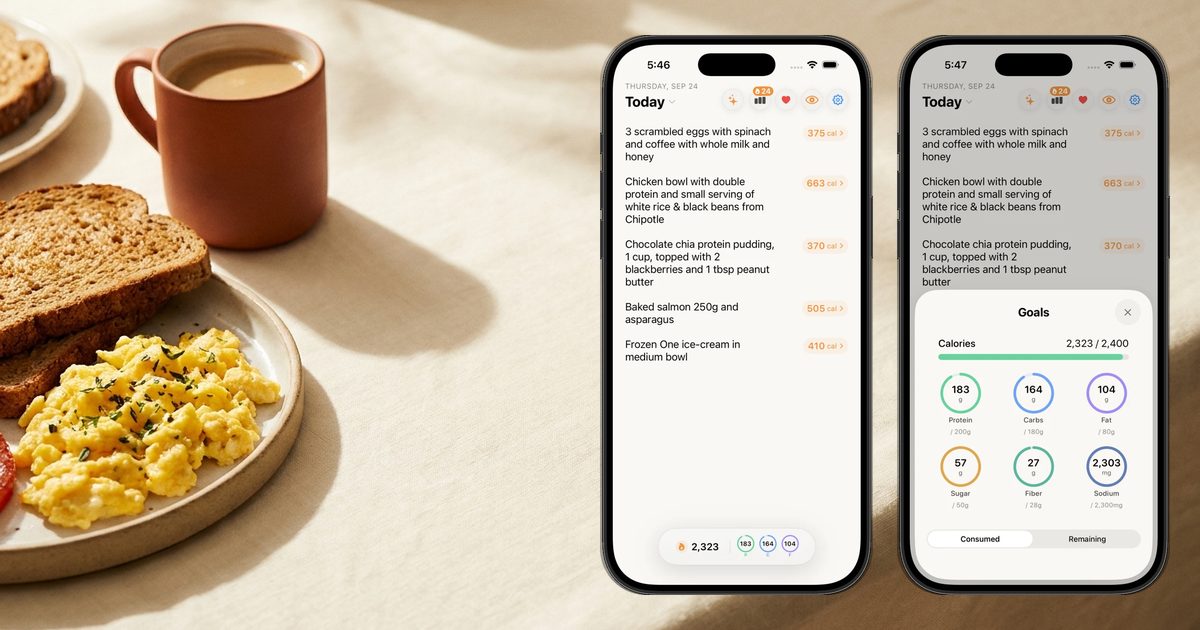
To track calories in Apple Notes, keep one pinned note per day: your target at the top, each meal as a line with calories and protein, and a running total. On iOS 18 and later, Notes can do the adding: type an expression with an equal sign and it solves inline. Our USDA-checked sample day below totals 1,799 calories and 121 g protein.
Why Apple Notes works as a calorie tracker
Apple Notes is already on your iPhone, it opens instantly, and writing "2 eggs, toast" takes three seconds. That is the whole secret of food logging: the method you will actually use beats the method that is technically best. Most people who quit tracking do not quit because the numbers were wrong. They quit because logging felt like admin.
I learned that the hard way. My first tracker was MyFitnessPal, and the numbers were fine. Logging a normal dinner took several minutes of searching and picking entries, and after a long day I just would not do it. A note has none of that friction. You write what you ate the way you would text it to a friend.
The tradeoff is that a note does not know anything about food. Every number in it is a number you looked up, and every total is a total you add. The template below makes that as painless as possible, and the Math in Notes trick removes most of the adding.
The free Apple Notes calorie tracker template (copy this)
Create a folder called "Food log," then a new note each day. Copy this in and replace the numbers:
Mon Oct 13 · target 1,900 cal · protein 130 g

Breakfast
2 eggs, 2 slices whole-wheat toast, 1 tsp olive oil · 344 cal · 21 P

Lunch
1 cup chicken breast, 1 cup white rice, 1/2 cup broccoli · 463 cal · 49 P

Snack
Greek yogurt (7 oz), 1 medium banana · 251 cal · 21 P

Dinner
3 oz salmon, medium baked potato, 1 tbsp olive oil · 455 cal · 23 P

Evening
1 medium apple, 2 tbsp peanut butter · 286 cal · 7 P

Total: 1,799 cal · 121 P
Left: 101 cal · 9 P
Notes: hungry at 4pm, move the yogurt earlier
The date and target go in the first line, which Notes uses as the note's title, so your notes list reads like a calendar. One line per meal keeps it scannable. The closing comment is the line people skip and the one that makes the weekly review useful.
If you want to go faster than this, try saying the meal instead of typing it. Write "breakfast, two eggs and toast" in a note and you still have to look up 344. Say it to Siri with Nouri and the 344 shows up by itself.
How to automate the math with Math in Notes
The most annoying part of a Notes log is adding. On iOS 18 and later, Apple Notes has built-in math: per Apple's guide, you can "solve equations, assign variables, and plot graphs," and expressions are solved inline when you type an equal sign. Variables are the key. Apple's Math Notes guide says you declare a variable by typing a word, an equal sign, and a value or expression, then use that word in later expressions.
So the same day can total itself. Put the math block under your meal lines:
target = 1900
breakfast = 143 + 161 + 40
lunch = 231 + 205 + 27
snack = 146 + 105
dinner = 175 + 161 + 119
evening = 95 + 191
breakfast + lunch + snack + dinner + evening =
target - (breakfast + lunch + snack + dinner + evening) =
The second to last line returns 1,799, and the last returns 101 calories left. Change any number and, per Apple, results that use that variable update automatically. Three rules from Apple's guide keep it working:
- Declare before you use. Notes reads from top to bottom, so a variable must be defined above the line that uses it, or you get an error.
- Latin letters only in variable names. "breakfast" works; emoji do not.
- Keep math on its own lines. Variables cannot be used in vertical (stacked) math, and keeping food descriptions on separate lines makes it easy to see what Notes understood. Tap an equal sign to check how Notes read the line.
You can do the same for protein with a second set of variables (bp, lp, sp, dp, ep). That is about as automated as a note gets: the adding is handled, but every individual number still has to come from you.
The sample day, with the math
Every number in the template is from USDA FoodData Central, using USDA's own portion weights, rounded per item:
| Meal | Items (USDA FDC ID) | Calories | Protein |
|---|---|---|---|
| Breakfast | 2 large eggs (171287) 143, 2 slices whole-wheat bread (172688) 161, 1 tsp olive oil (171413) 40 | 143 + 161 + 40 = 344 | 13 + 8 + 0 = 21 g |
| Lunch | 1 cup roasted chicken breast (171477) 231, 1 cup cooked white rice (168878) 205, 1/2 cup boiled broccoli (169967) 27 | 231 + 205 + 27 = 463 | 43 + 4 + 2 = 49 g |
| Snack | 7 oz lowfat plain Greek yogurt (170903) 146, 1 medium banana (173944) 105 | 146 + 105 = 251 | 20 + 1 = 21 g |
| Dinner | 3 oz cooked Atlantic salmon (175168) 175, 1 medium baked potato (170093) 161, 1 tbsp olive oil (171413) 119 | 175 + 161 + 119 = 455 | 19 + 4 + 0 = 23 g |
| Evening | 1 medium apple (171688) 95, 2 tbsp peanut butter (172470) 191 | 95 + 191 = 286 | 0 + 7 = 7 g |
| Day | 344 + 463 + 251 + 455 + 286 = 1,799 | 21 + 49 + 21 + 23 + 7 = 121 g |
Running total through the day: 344 after breakfast, 807 after lunch, 1,058 after the snack, 1,513 after dinner, 1,799 at bedtime. Notice the two olive oil lines: 40 + 119 = 159 calories, about 9 percent of the day, from ingredients you cannot see on the plate. That is the most common thing people leave out of a note, and one of the common food logging mistakes that quietly stalls progress.
Your target is your own. Work out a starting number with TDEE Explained, and set protein with the protein intake calculator.
Apple Notes features that make tracking easier
These are real Notes features, each checked against Apple's iPhone User Guide on October 13, 2026.
Pinned notes. Pin today's note so it sits at the top of the list: touch and hold the note, then tap Pin Note, or swipe right and tap the pin. Unpin it at night and pin tomorrow's.
Folders. Make a "Food log" folder, and if you want, a subfolder per month (drag one folder onto another). Keep your weekly review notes in the same folder so everything is in one place.
Checklists. Tap the checklist button to turn lines into tick boxes. They work well for a daily habit list ("logged breakfast," "protein over 100 g," "10-minute walk") or for the grocery list that makes the week's meals possible.
Tables. Tap the table button if you prefer columns: Meal, Food, Calories, Protein. A table reads beautifully but Apple's guide does not describe tables totaling a column, so keep a math line below the table for the total.
Headings and collapsible sections. Format each meal as a heading and you can collapse the day down to five lines, which helps when a note gets long.
Shared notes for couples. If you and a partner cook the same meals, share a note or a whole folder through iCloud. Apple's guide says participants see changes in real time; you choose "People you choose" or "Anyone with the link," and Edit or View and Download Only. Both people need to be signed in to their Apple Account with Notes turned on in iCloud. A shared "Meals we cook" note with per-serving calories means only one person has to do the math for dinner.
The weekly review note
The daily notes are the log. The weekly note is where you learn something. Every Sunday, make one note and copy each day's total into it:
Week of Oct 13 · target 1,900 · protein 130 g
mon = 1799
tue = 0
wed = 0
thu = 0
fri = 0
sat = 0
sun = 0
(mon + tue + wed + thu + fri + sat + sun) / 7 =

Days within 100 of target:
Days protein hit:
Best day and why:
Hardest day and why:
One thing to change next week:
Replace each 0 with that day's total and Math in Notes gives you the weekly average. The questions underneath matter more than the average. Two weeks of "hardest day: Friday dinner out" tells you exactly where to focus; our guide to logging restaurant meals helps with that one.
The honest limits of Apple Notes for calories
Notes is a great place to write, and that is all it is. Here is what it cannot do:
- No food data. Every calorie and gram of protein comes from you looking it up. That lookup is the slow part, and it is the step most people stop doing.
- No automatic macros. If you want carbs, fat, fiber, or sodium, that is more columns and more lookups.
- Hard to see trends. You can average a week by hand, but there is no chart of the last month, no days-on-target streak, nothing that notices you under-eat protein every Tuesday.
- No Apple Health. A note does not write dietary energy to the Health app, so nothing else on your phone sees what you ate. More in Does Apple Health Track Calories Eaten?
- It only knows what you remember. If you skip writing the oil or the latte, the total is wrong, and nothing prompts you.
None of these are reasons not to start. They are why a note tends to stop working once you want answers rather than totals.
| Apple Notes | Apple Notes with Math in Notes | Nouri | |
|---|---|---|---|
| How you log | Type a line | Type a line | Type it like a note, say it, snap a photo, or ask Siri |
| Calorie numbers | You look them up | You look them up | Estimated instantly, per item, with reasoning |
| Daily total | You add it | Automatic | Automatic, with what is left |
| Macros, fiber, sugar, sodium | Only what you type | Only what you type | Tracked, with daily goals |
| Weekly review | Manual note | Manual note, auto average | Nouri Reports |
| Apple Health | No | No | Writes nutrition; reads calories burned, workouts, steps |
| Price | Free | Free | $9.99/month or $39.99/year, 3-day free trial |
Track your calories like a note: Nouri
"Track your calories like a note" is Nouri's tagline, and it is literal. The input is the same line you would write in Apple Notes: "2 eggs, 2 slices whole-wheat toast, cooked in a teaspoon of olive oil." The difference is what happens next. Nouri returns calories and macros instantly, item by item, with the reasoning for each number and a confidence rating. If the portion looks off, add context like "large slices" or "cooked in butter" and recalculate. The note stays; the math disappears.
Typing is only one of four equal ways in. You can say it, snap a photo (Nouri turns the photo into a sentence first, so you can correct what it saw before anything is counted), or ask Siri from the lock screen: "Hey Siri, track food in Nouri," one sentence, and the calories and macros card appears with what you have left for the day. Your note never had a running total that followed you to the lock screen.
Everything the limits section listed is handled. Nouri tracks protein, carbs, fat, fiber, sugar, and sodium against daily goals, gives each meal a Health Score and a vitamin scorecard (A, C, D, iron, calcium), writes your nutrition to Apple Health, and reads calories burned, workouts, and steps. Turn on Prioritize Protein and your protein target moves from 1.0 to 1.2 g per pound of body weight. We publish how the numbers hold up, too: Nouri scored 92.1/100 in our 100-meal accuracy benchmark (MyFitnessPal 77.0).
The weekly review note becomes a Nouri Report. Most calorie apps give you numbers. Nouri gives you answers: your first report after 3 logged days, then every Sunday you log 4 or more days, with averages against your targets, days on target, wins, slips, and one clear focus for next week. It is the "one thing to change next week" line, written for you. Nouri is iPhone (iOS only), and you can try it free.
Common mistakes with a Notes calorie log
- Writing food without numbers. "Pasta for dinner" is a diary, not a log. Add the calories the same day, while you remember portions.
- Forgetting cooking fat and drinks. In the sample day, oil alone was 159 calories.
- One giant note for everything. A single endless note is hard to scan and impossible to review. One note per day, one per week.
- Guessing portions small. When torn between two sizes, write the bigger one. See How to Track Calories Without Weighing Food.
- Skipping the weekly review. Without it you have a pile of notes and no feedback. Ten minutes on Sunday is the whole system.
FAQ
Can you track calories in Apple Notes?
Yes. Keep one note per day with your target, a line per meal with calories and protein, and a total. On iOS 18 and later, Math in Notes can add the numbers for you when you type an equal sign.
Does Apple Notes have a calorie counter?
No. Notes does not know what foods contain, so you look up every number yourself. What it can do, on iOS 18 and later, is the arithmetic: assign variables like "lunch = 231 + 205 + 27" and total them automatically.
How do I make Apple Notes add up numbers?
Type a math expression followed by an equal sign, such as "344 + 463 =," and Notes solves it inline. For a full day, assign each meal to a variable and add the variables on a later line. Variables must be declared above where you use them.
What is the best Apple Notes template for tracking calories?
Date and target in the first line, one line per meal with food, calories, and protein, then a total, what is left, and a short comment. The copyable template above follows that format, and the weekly review note sits alongside it in the same folder.
Can I track macros in Apple Notes?
You can, by adding columns or a second set of math variables for protein, carbs, and fat. Most people find protein alone is manageable and full macros become too much lookup work.
Can my partner and I share a calorie tracking note?
Yes. Share a note or a folder through iCloud with "People you choose," and give Edit access. Changes show up in real time, which works well for meals you cook together.
Is Apple Notes better than a calorie counting app?
It is faster to start and completely free, which makes it great for a first week. It is weaker on food data, macros, trends, and Apple Health, which is where a dedicated app earns its place.
Does Apple Notes sync calories to Apple Health?
No. Notes does not write nutrition data to the Health app. If you want calories eaten in Apple Health, you need an app that writes dietary data there.
How do I see my weekly calorie average in Apple Notes?
Make a weekly note, assign each day's total to a variable, and type the sum divided by 7 followed by an equal sign. Then answer a few review questions underneath, because the pattern matters more than the average.
How many calories should I eat per day?
It depends on your size, activity, and goal. Estimate your maintenance with TDEE Explained, and if you have a goal weight, the goal weight date calculator shows how long it may take.
What is the easiest way to track calories like a note?
Write the meal the way you would in Notes and let an app do the rest. In Nouri you type, say, or snap the meal, or ask Siri from the lock screen, and calories, macros, and what is left appear instantly, then roll up into a weekly report.
Bottom line
Apple Notes is a genuinely good free calorie tracker if you keep it simple: one pinned note per day, one line per meal, a Math in Notes block that totals itself, and a weekly review note on Sunday. The sample day above shows the whole method with USDA numbers, 1,799 calories and 121 g of protein. When looking up every number gets old, keep the note and drop the math with Nouri. Start with Calorie Counting 101 if you are new, and How to Stick to Calorie Tracking when motivation dips.
Sources
- Apple, Create and format notes on iPhone (checklists, tables, headings), support.apple.com/guide/iphone/create-and-format-notes-iph1ac0b3a2/ios (checked October 13, 2026)
- Apple, Enter formulas and equations in Notes on iPhone (available in the iOS 18 guide and later), support.apple.com/guide/iphone/enter-formulas-and-equations-iphb9c2b948f/ios (checked October 13, 2026)
- Apple, Solve math with Math Notes in Calculator on iPhone (variables), support.apple.com/guide/iphone/solve-math-with-math-notes-iph46efa613a/ios (checked October 13, 2026)
- Apple, Organize your notes in folders on iPhone (folders, pinning), support.apple.com/guide/iphone/organize-in-folders-ipha61270292/ios (checked October 13, 2026)
- Apple, Share notes and collaborate on iPhone, support.apple.com/guide/iphone/share-and-collaborate-iphe4d04f674/ios (checked October 13, 2026)
- USDA FoodData Central (all checked October 13, 2026): egg, whole, raw, FDC 171287; whole-wheat bread, FDC 172688; olive oil, FDC 171413; chicken breast, roasted, FDC 171477; white rice, cooked, FDC 168878; broccoli, boiled, FDC 169967; Greek yogurt, plain, lowfat, FDC 170903; banana, raw, FDC 173944; Atlantic salmon, farmed, cooked, FDC 175168; potato, baked, flesh and skin, FDC 170093; apple, raw, with skin, FDC 171688; peanut butter, smooth, FDC 172470
Keep reading
All articlesAre AI Calorie Apps Accurate? What the 2026 Research Actually Shows
A 2026 study found an AI photo app underestimated intake by 25%. What the research says about AI calorie apps, and why a photo can't see the oil.
GuidesIn a Calorie Deficit But Not Losing Weight? 9 Reasons and the Fix for Each
In an NEJM study, people reporting under 1,200 calories underreported intake by 47%. 9 reasons the scale won't move, with a fix for each.
GuidesHow Many Calories Do You Need While Breastfeeding? (CDC vs ACOG, Explained)
The CDC says 330 to 400 extra calories a day while breastfeeding; ACOG says 450 to 500. Why they differ and how to find your own number.
Guides'Mom Calories': What Eating Your Kids' Leftovers Really Adds Up To
3 nuggets, some crusts, cheese crackers and juice sips add up to about 297 calories a day, or 2,079 a week. The guilt-free tally, with USDA numbers.